
Fees & add-ons
Open /dashboard/assets/feesYour product price covers a plain garment. Fees add the extras on top: $1.50 for every embroidered logo, $4 on 2XL and bigger, $2 for each name and number, a $50 rush option. You set them once, and every quote, cart and checkout adds them for you.
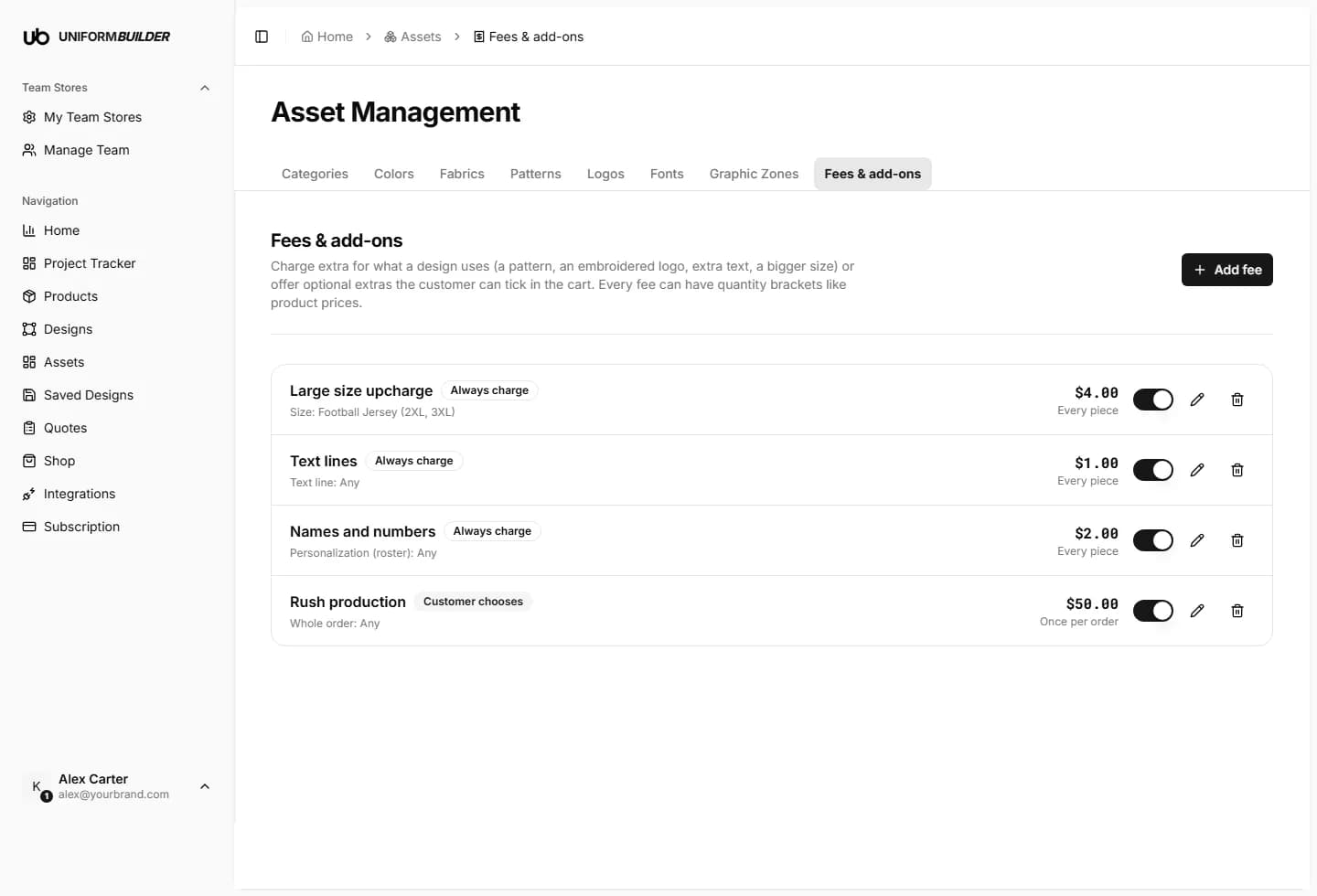
Four words to know first
| Field | What it does |
|---|---|
| Piece | One physical garment you produce. A roster of 5 players is 5 pieces. It has nothing to do with letters or characters. |
| Design | One line in the cart: a product with its artwork and its sizes. 5 jerseys with the same artwork are 1 design. |
| Order | The whole cart the customer sends you. It can hold several designs. |
| Text line | One text box on the design, like "EAGLES" or "2026". The number of letters does not matter: "A" and "CHAMPIONSHIP TEAM 2026" are both 1 text line. |
Creating a fee, step by step
- 1
Click Add fee.
You land on a page with ready-made templates at the top and every fee type below, grouped by what it charges for.
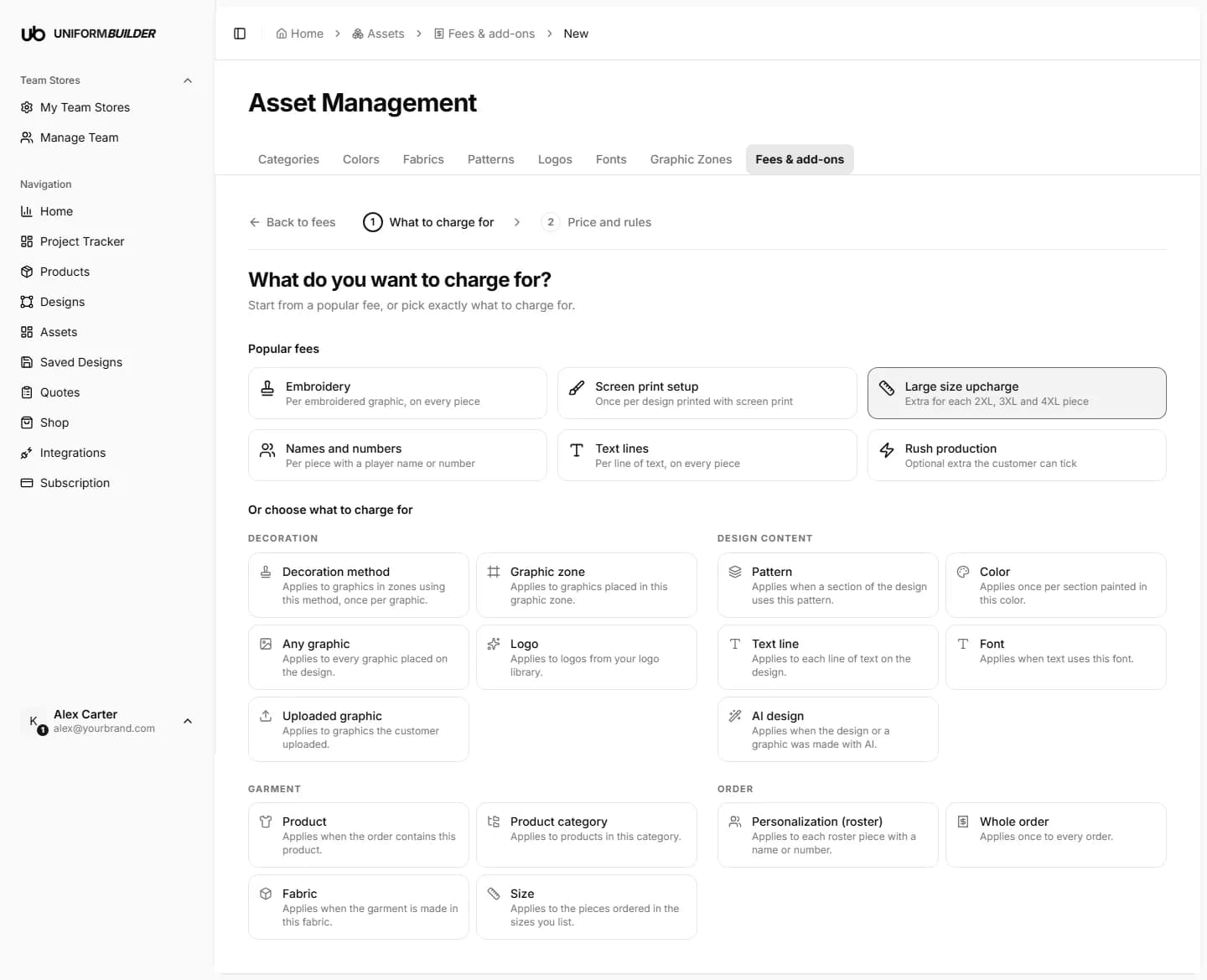
Step 1: pick a template or a type. - 2
Pick a template (fastest) or a type.
A template fills in a sensible name and charging rule for you. You can change everything on the next step.
- 3
Choose what it applies to, if the type asks.
For example one specific pattern, or any pattern. The cards show the real item, with its picture or colour, so you know what you are picking.
- 4
Set how much and how it is charged.
The Example box on the right recalculates as you type and tells you in one sentence what a real customer would pay.
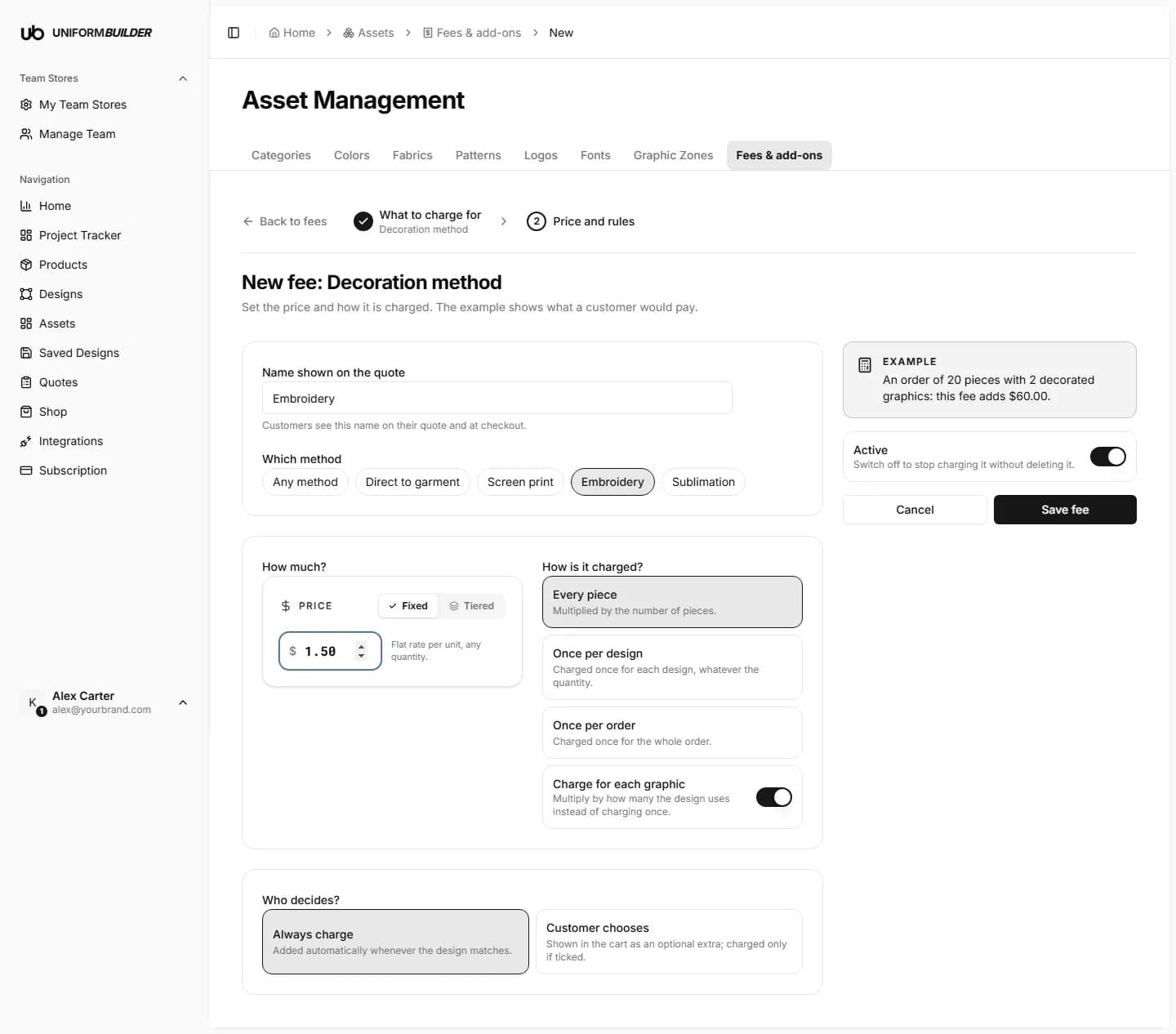
Step 2: the example on the right shows the result before you save. - 5
Choose who decides: always charge, or let the customer choose.
- 6
Click Save fee. It applies to new quotes straight away.
What a fee can charge for
| Field | What it does |
|---|---|
| Text line | Each text box with text in it. Empty boxes are ignored. |
| Font | Each different font used. Two text lines in the same font count as 1 font. |
| Any graphic | Every image placed on the design, wherever it came from. |
| Logo | Only graphics taken from your own logo library. The file type (PNG or SVG) makes no difference. |
| Uploaded graphic | Only images the customer uploaded themselves. |
| AI design | Designs or graphics made with the AI generator. |
| Pattern | Each different pattern used. The same pattern on the front and the back still counts as 1 pattern. |
| Color | Each coloured section of the garment in a colour you pick. |
| Fabric | The garment is made in the fabric you pick. |
| Graphic zone / Decoration method | Each graphic placed in a graphic zone, or decorated with a method such as embroidery or screen print. |
| Size | Only the pieces in the sizes you tick, for example 2XL and 3XL. |
| Personalization (roster) | Only the pieces that carry a name or a number. |
| Product / Product category | Every design made on that product or in that category. |
| Whole order | Every order. Used for rush, handling or setup fees. |
How it is charged
| Field | What it does |
|---|---|
| Every piece | Multiplied by the number of garments. 5 jerseys at $1 = $5, 50 jerseys = $50. Use it for work repeated on every garment, like embroidery. |
| Once per design | Charged one time per design, whether it is 5 jerseys or 500. Use it for setup work, like making a screen or digitising a logo. |
| Once per order | Charged one time for the whole cart, however many designs it holds. |
| Charge for each one | An extra switch for items a design can have several of (text lines, fonts, logos, patterns). It also multiplies by how many the design has: 3 text lines pay 3 times. |
A full example, worked out
A customer designs a basketball jersey (design A) with 3 text lines (2 in the same font, 1 in another), 4 logos (2 from your logo library, 2 uploaded), 1 pattern on 1 of the 5 colour groups, and a fabric. Their roster has 5 players: 3 M, 1 L, 1 2XL, each with a name and number. So the order is 5 pieces.
Step 1: what the system counts on design A
| Field | What it does |
|---|---|
| Text lines | 3 |
| Fonts | 2 (two lines share a font) |
| Any graphic | 4 |
| Logos | 2 (from your library) |
| Uploaded graphics | 2 |
| Patterns | 1 |
| Fabric | 1 |
| Size 2XL | 1 piece |
| Personalization | 5 pieces |
Step 2: what a $1 text line fee charges
| Field | What it does |
|---|---|
| Every piece | 5 jerseys × $1 = $5 |
| Every piece + charge for each one | 5 jerseys × 3 text lines × $1 = $15 |
| Once per design | $1 |
| Once per design + charge for each one | 3 text lines × $1 = $3 |
| Once per order | $1 |
Other $1 fees on the same order, charged "Every piece"
| Field | What it does |
|---|---|
| Font, charge for each one | 5 jerseys × 2 fonts = $10 |
| Any graphic, charge for each one | 5 jerseys × 4 graphics = $20 |
| Uploaded graphic, charge for each one | 5 jerseys × 2 uploads = $10 |
| Pattern | 5 jerseys × $1 = $5 |
| Fabric | 5 jerseys × $1 = $5 |
| Size 2XL | Only the 1 jersey in 2XL pays: $1 |
| Personalization | 5 jerseys with a name or number: $5 |
Now the customer adds design B: 10 hoodies with 1 text line. The same $1 text line fee becomes:
| Field | What it does |
|---|---|
| Every piece | $5 (jerseys) + $10 (hoodies) = $15 |
| Once per design | $1 (design A) + $1 (design B) = $2 |
| Once per order | $1, only once for the whole cart |
Nothing matches, nothing is charged
A pattern fee does nothing on a design with no pattern, and a 2XL fee does nothing on an order with no 2XL. You can create fees freely: customers only pay for what they actually use.
Charging more for bigger sizes
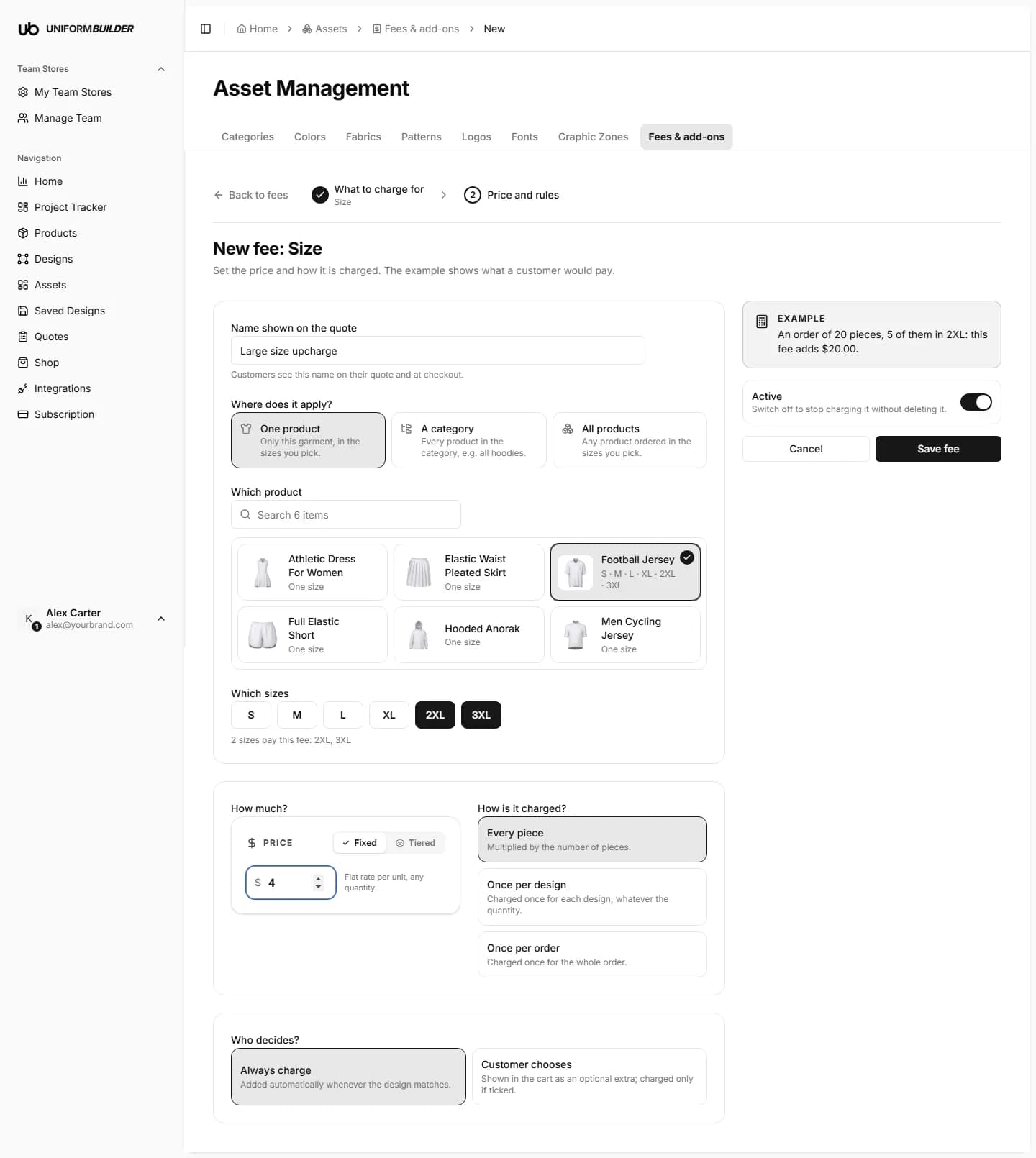
Pick the Size type (or the Large size upcharge template), then choose where it applies: one product, a category, or all products. The sizes that product actually offers appear, and you tick the ones that pay.
Note
Sizes come from each product's Pattern Sizes tab. A product with no sizes set up shows "One size" and cannot carry a size fee until you add them.
Optional extras the customer chooses
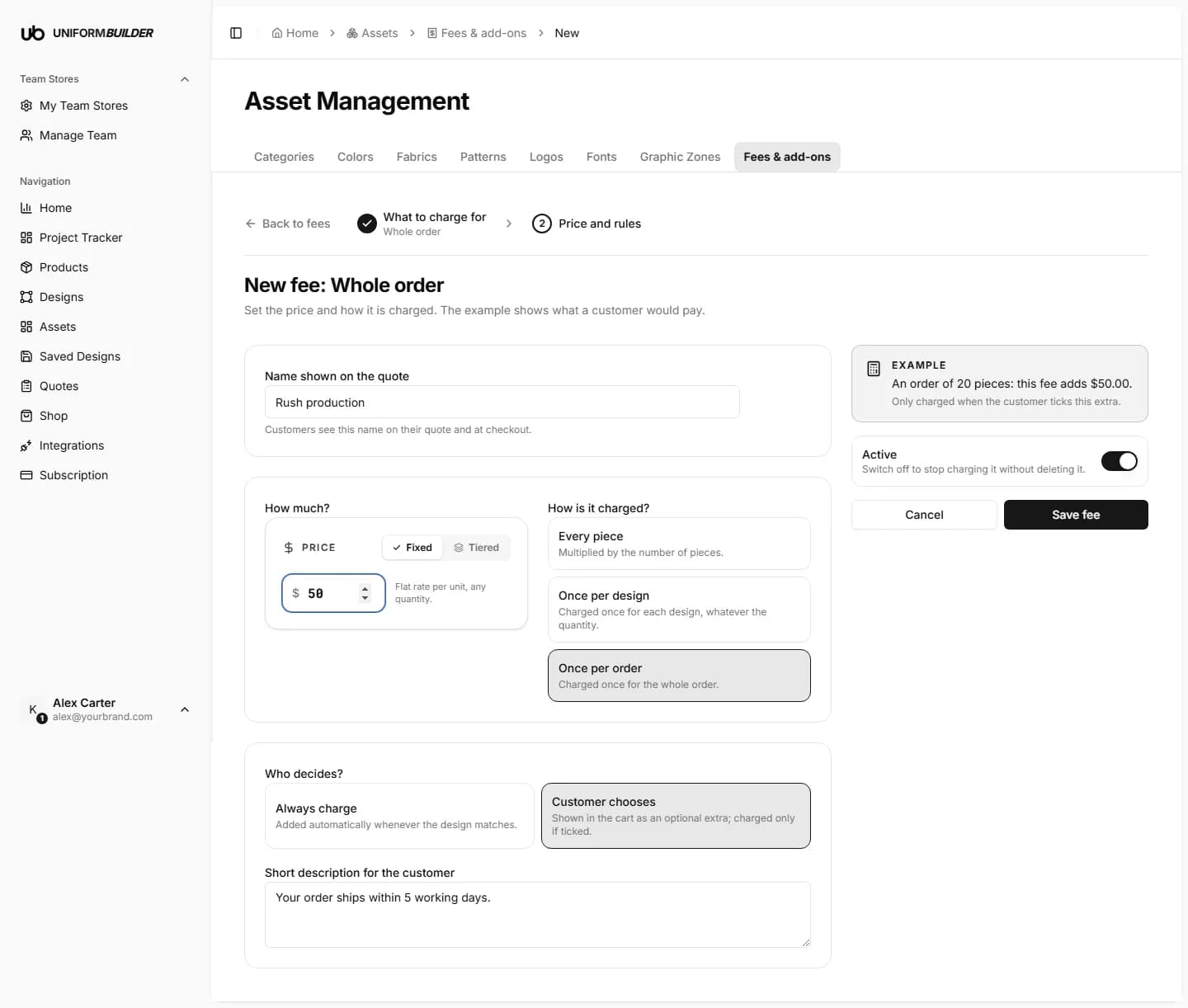
Set Who decides? to Customer chooses and the fee becomes a checkbox in the customer's cart, with its price for their own order next to it. It is only charged if they tick it. Add a short description so they know what they are paying for.
Cheaper in bulk: price brackets
Switch the price from Fixed to Tiered to charge less for bigger quantities, for example $2 per piece from 1 to 49 and $1 from 50 up. Every piece and Once per design look at that design's quantity. Once per order looks at the whole cart.
Where fees show up
- In the cart, as a breakdown under the subtotal, with the optional extras as checkboxes.
- On the quote and its PDF, line by line.
- At checkout in Stripe, Shopify and WooCommerce, as separate lines.
Note
A quote keeps the fees it was sent with. Changing or switching off a fee later only affects new quotes.
Can I charge per letter?
Not today. Text is charged per text line (per text box), whatever its length.
Can I charge PNG and SVG logos differently?
No. Fees look at where a graphic came from (your library, a customer upload, AI), not its file type.
I want to stop a fee for a while without losing it.
Turn off the Active switch on the fee. Turn it back on whenever you like.
A fee shows $0 in the example.
It has no price yet, or the example order does not contain what it charges for. Check the price box and what the fee applies to.